 Skip to content

I. Executive Summary: The Quiet Catastrophe of Token Mismanagement
Modern digital operations depend on massive data stores. Transactional data often sits in structured databases, while large volumes of unstructured content such as media, JavaScript assets, logs, and backups are kept in cloud object storage. Azure Blob Storage is a core service built for availability, scale and performance.
Developers use Azure Shared Access Signature tokens to grant temporary delegated access without exposing long term account keys. However, creating overly permissive or long term SAS tokens introduces a serious vulnerability. If a token is leaked in code repositories, logs, or network traffic, it can act as a persistent backdoor with rights similar to the full storage account key. This tension between development speed and the Zero Trust principle of least privilege is the root of the risk.
II. The Infrastructure Foundation: Azure Blob Storage and Client-Side Access
2.1. Why Unstructured Data Demands Cloud Storage
Modern applications generate huge volumes of unstructured data that traditional relational database architectures cannot efficiently scale to accommodate. Azure Blob Storage is Microsoft’s object storage solution, purpose-built for this environment. It provides highly scalable, secure, and available storage that serves as the foundation for powerful cloud-native applications, serverless architectures, and advanced services such as Azure Data Lake Storage for big data analytics.
A storage account organizes data into containers, which, in turn, hold various types of binary large objects (blobs). These can include standard Block Blobs (for text and binary data, up to 190.7 TiB, Append Blobs (optimized for logging), and Page Blobs (used for Azure virtual machine VHD files). The systemic value of Blob Storage is high; it is the repository not only for public web assets but also for sensitive internal components like machine learning training data, internal system backups, and confidential application logs. If a token intended for a single public image is compromised, the threat actor gains potential access to these systemic organizational assets, confirming that storage compromise has deep implications.
2.2. Authorizing Client Access: The Necessity of Delegation
Client applications, such as web browsers fetching frontend assets or mobile applications downloading updates, must access objects in Blob Storage directly via HTTP/HTTPS endpoints.
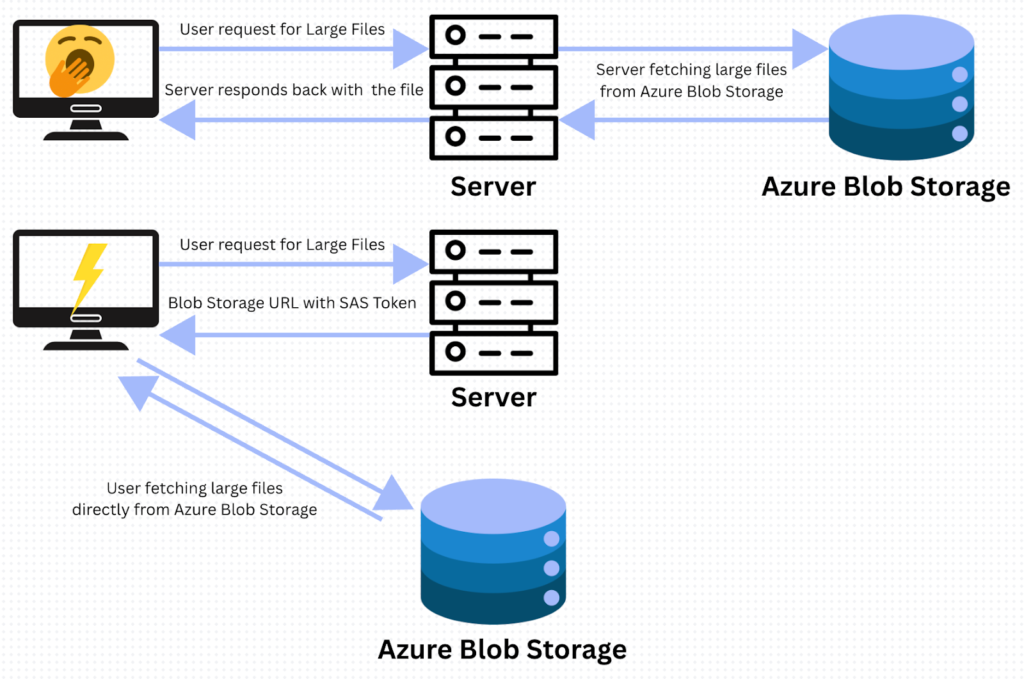
Relying on the Storage Account Access Keys for client-side access is prohibited by security best practices. These keys are considered the “master keys” as they grant unrestricted, full administrative access to the storage account data, including the critical ability to generate new SAS tokens. Protecting these keys, ideally by storing them securely in Azure Key Vault, is paramount, necessitating an alternative mechanism for temporary delegation of access: the SAS token.
III. The Anatomy of Delegation: Dissecting the Azure SAS Token
A Shared Access Signature (SAS) token is a signed Uniform Resource Identifier (URI) that provides delegated access to Azure Storage resources. These tokens are appended as query strings to the resource URL and must be protected with the same vigilance as an account key, transmitted exclusively over HTTPS.
3.1. Types of Shared Access Signatures
Azure supports several types of SAS tokens, each with distinct scopes and security mechanisms:
- User Delegation SAS (UDSAS): This is the mechanism recommended by Microsoft, secured via Microsoft Entra ID credentials (formerly Azure AD). Crucially, the maximum validity period for a UDSAS is strictly enforced at seven days, providing a vital temporal security control.
- Service SAS: Delegates access to resources within one specific Azure storage service (e.g., Blob Storage only).
- Account SAS: Delegates access across multiple storage services, potentially encompassing Blob, File, Queue, and Table services. This type carries the highest inherent risk when misconfigured due to its broad resource span.
3.2. Critical SAS Parameters and Their Security Significance
The security posture of a SAS token is defined by four core parameters embedded in the query string:
- Temporal Constraint (se and st): The parameters st (Start Time) and se (Expiry Time) define the token’s validity window in UTC. When developers set expiry times for years into the future, as frequently occurs in misconfigurations, the token fundamentally violates the principle of temporary access. This provides a persistent entry point for any threat actor who compromises the token.
- The Permissions (sp): This parameter specifies the signed permissions, defining the exact actions permitted by the token (e.g., read, write, delete). Failure to apply the Principle of Least Privilege (PoLP) occurs when unnecessary permissions are included here.
- The Resource Scope (sr): This identifies the level of access granted. Common values include sr=b for a specific blob (object), or sr=c for an entire container. Defining the scope too broadly, such as granting access to an entire container when only one file is needed, is a common error.
- The Service Scope (ss): Applicable primarily to Account SAS tokens, this defines which services are accessible. For example, ss=bfqt grants access to Blob, File, Queue, and Table services. A developer intending to grant access only to web assets (Blobs) who inadvertently creates an Account SAS with this scope immediately expands the blast radius. The compromise of such a token can disrupt application processing via unauthorized access to sensitive queue messages or the theft of configuration data stored in Tables, leading to systemic failure across interconnected services.
Table: Key Permission Symbols for Azure SAS Tokens (Partial Account/Service SAS List)
| Symbol | Permission Name | Resource Type | Risk Implication if Compromised |
| r | Read | Container, Blob | Data exfiltration, information disclosure |
| w | Write | Container, Blob | Uploading malware/malicious files |
| d | Delete | Container, Blob | Denial of Service (DoS) attack |
| l | List | Container, Directory | Enumeration of storage contents/structure |
| a | Add | Container, Queue | Adding new data (e.g., queue message abuse) |
| c | Create | Container, Blob | Creating new resources (cost abuse potential) |
| u | Update | Blob | Modifying existing files (e.g., XSS injection) |
| p | Process | Queue | Accessing and processing queue messages |
| t | Tags | Blob | Modifying metadata tags |
IV. The Security Gap: Developer Convenience Over Zero Trust
4.1. The Path of Least Resistance: Why Maximum Permissions are Chosen

The primary cause for the proliferation of overly permissive SAS tokens is rooted in operational friction. Development teams often prioritize speed and convenience, choosing to avoid the “hassle in development due to least principle policy” and opting to “save time” .
During proof-of-concept testing or rapid development phases, it is common practice for engineers to use “full control” permissions (sp=rwdlacup…) and set expiration dates years in the future. This prevents the disruption caused by tokens expiring during debug cycles. When these development configurations are migrated to production environments without proper security review or adjustment, the result is a critical, latent vulnerability.
4.2. Overly Permissive SAS Tokens as De Facto Account Keys
When a compromised token grants broad scope (sr=c), covers multiple services (ss=bfqt), grants full control permissions (rwdlacup), and is active for years, it ceases to be a delegated temporary credential and becomes, in effect, an exposed secondary account key for the storage resource.
This risk is substantiated by major incidents. In June 2023, Microsoft AI researchers inadvertently exposed 38 TB of sensitive internal data. The exposure occurred because a researcher published a blob store URL containing an overly permissive SAS token in a public GitHub repository. This misconfiguration granted full access to the entire storage account, exposing proprietary tools, internal Teams messages, credentials, and backups of two employee workstations. This real-world incident confirms that such misconfigured tokens carry the highest level of security risk, often bypassing existing perimeter controls.
The prevalence of this issue stems from the ease of generating a powerful Account SAS versus the necessary complexity of configuring a precise, short-lived Service or User Delegation SAS. Security defenses must recognize this friction point and pivot toward prevention-by-default, employing mechanisms like Azure Policies to automatically reject or enforce maximum 7-day expiry limits on all non-UDSAS token creations.
V. Threat Vector Analysis: Four Critical Impacts of SAS Token Compromise
When a high-value SAS token is leaked (e.g., found in public code repositories, logs, or exposed endpoints), the resulting compromise involves four distinct categories of business impact.
- Complete Data Confidentiality Breach
A compromised token with Read (r) and List (l) permissions lets an attacker enumerate containers and blobs, effectively mapping the entire storage layout.
This enables large scale data exfiltration of sensitive files, intellectual property, logs, and PII from backups or user records, as seen in past incidents exposing internal communications and workstation profiles. - Integrity Compromise and Malware Distribution
Tokens with Write (w) and Update (u) permissions permit modification or replacement of existing files, turning storage into a vector for malicious content.
An attacker can distribute malware by swapping legitimate installers or updates and can inject malicious JavaScript or CSS into assets served to web users, enabling session theft and client side compromise. - Availability Risk via Denial of Service (DoS)
Delete (d) permission allows rapid removal of containers or blobs, which can immediately break application functionality that depends on those assets.
Recovery requires revoking tokens and restoring data from backups, causing significant operational downtime and reputational harm. - Financial Abuse and Cloud Cost Inflation
Create (c), Add (a), and Write (w) permissions let an attacker upload large volumes of data, abusing the victim account for storage.
This can trigger dramatic spikes in billing and consume quota or throughput, effectively turning the organization into a free hosting platform for illicit content or wasting cloud budgets.
VI. Hunting the Exposed Secret: Where SAS Tokens Are Found
A Shared Access Signature is a secret, and like any leaked credential, its presence in publicly accessible locations poses an immediate threat. Given the typically long lifespan of misconfigured SAS tokens, security researchers and pentesters must treat every instance of an exposed token as a critical vulnerability. The primary vector for compromise is accidental publication in publicly indexable or client-facing application layers.
Key locations where overly permissive SAS tokens are commonly discovered include:
- Public code repositories are the most common exposure point. Tokens often appear in config files, debug notes, or commits on platforms like GitHub and GitLab and can remain discoverable in commit history after they are removed. Tools such as TruffleHog use regex patterns to scan repositories and past commits for leaked secrets.
- Client-Side Web Assets: Application logic often embeds SAS tokens directly into frontend files—specifically JavaScript (JS) and CSS—to allow users’ browsers to fetch media, fonts, or application-specific data directly from Azure Blob Storage. These tokens are easily visible via a browser’s developer tools. To detect such exposures, you can use tools like JSMon, which continuously monitors and scans all JavaScript assets of an organization for hardcoded keys, secrets, and other sensitive data leaks.

Figure showing JSMON detected Azure SAS Token leaked in JS files
- API and File URLs: When a web application or mobile app requests a file or attachment, the API response often provides a full, pre-signed URL to the file, which includes the SAS token as a query string parameter.Intercepting or reviewing network traffic reveals these exposed URLs.
- Public Documentation and Configuration Pages: Tokens intended for limited sharing (e.g., with partners or for data science collaboration) are sometimes posted directly onto public documentation wikis, blog posts, or configuration guides. These pages may be indexed by search engines or archived.
- Archival and Historical Data: Due to their multi-year expiry dates, old, valid tokens can often be found in web archive services like the WayBack Machine, or within outdated public-facing documentation pages that were never fully removed.
VII. Validation and Exploitation: Testing the CIA Triad
Once a potential SAS token is identified, a security researcher’s priority is to determine the severity of the issue by validating the token’s scope and permissions against the Confidentiality, Integrity, and Availability (CIA) triad. The Azure Command Line Interface az cli is the standard tool used to test these capabilities.
The process involves first identifying the target storage account and then systematically attempting actions that correspond to high-risk permissions. All these validation steps can also be performed using the Azure Storage Explorer graphical application, which utilizes the SAS token for authorization.
Step 1: Identify the Storage Account and Set Environment Variables
The storage account name is the first part of the subdomain in the SAS URL, followed by .blob.core.windows.net. Extract this information and set up shell variables for easy command execution.
# 1. Extract storage account name from the URL:
# Example: https://<storage-account-name>.blob.core.windows.net/
export AZURE_STORAGE_ACCOUNT=”<storage-account-name>”
# 2. Assign the full SAS token query string (starting with ‘?’)
export AZURE_STORAGE_SAS_TOKEN=”<SAS Token>”
Step 2: Test Confidentiality (C) – Container Listing
If the SAS token grants access to the service or the entire account sr=s or sr=c, the ability to list containers is a primary indication of broad information disclosure and high confidentiality risk.
# Attempt to list all containers in the storage account
# This checks for the ‘l’ (List) permission at the service/account level
az storage container list \
–account-name $AZURE_STORAGE_ACCOUNT \
–sas-token “$AZURE_STORAGE_SAS_TOKEN” \
–query “.name” \
–output table
If this command succeeds, the attacker has a map of all sensitive containers (e.g., backups, user-pii, logs). If it fails, the token may still be valid but is limited to a specific container, which must be identified from the original SAS URL structure (…windows.net/<container-name>/).
Step 3: Test Confidentiality (C) – Blob Listing within a Container
Once the container name is known, testing the ability to list and read the contents of that container confirms the data exfiltration risk.
# Replace <container-name> with the name found in Step 2 or the SAS URL
# This checks for the ‘l’ (List) and ‘r’ (Read) permissions at the container level
az storage blob list \
–account-name $AZURE_STORAGE_ACCOUNT \
–container-name <container-name> \
–sas-token “$AZURE_STORAGE_SAS_TOKEN” \
–output table
A successful output confirms the ability to enumerate files, which is a critical step before large-scale data exfiltration.

Figure showing Overly permissive SAS token allowing listing of all blobs.
Step 4: Test Integrity (I) and Availability (A) – File Upload
To test the Integrity of the data (the ability to inject malware/XSS payloads) and the risk of Availability attacks (DoS via deletion or cost abuse via mass upload), the researcher attempts to upload a test file.
First, create a simple test file named jarvis0p.svg.
Bash
# Attempt to upload/overwrite the test file
# This checks for the ‘w’ (Write), ‘c’ (Create), and ‘u’ (Update) permissions
az storage blob upload \
–container-name <container-name> \
–name jarvis0p.svg \
–file jarvis0p.svg \
–overwrite true \
–sas-token “$AZURE_STORAGE_SAS_TOKEN” \
–account-name $AZURE_STORAGE_ACCOUNT
A successful upload confirms a critical integrity vulnerability. If the token also includes Delete d permission, the threat actor has full control over the container, posing maximum risk to Confidentiality, Integrity, and Availability.

Figure showing successful file upload using azure CLI tool.
VIII. Case Studies in Compromise: From Leakage to Full Control
The following two case studies illustrate the progression of a SAS token compromise, from accidental exposure to full environment takeover, demonstrating both direct leakage and sophisticated architectural bypass.
6.1. Case Study A: The Publicly Accessible JavaScript Token Leak
Vulnerability Insight: A security analysis of a large public domain revealed that several Azure SAS tokens were openly embedded and exposed within publicly accessible front-end JavaScript files. This scenario represents a fundamental failure of secret management, similar to storing credentials directly in application code.

Figure showing Overly Permissive Azure SAS Token Exposed in Public JS File
Technical Analysis: The compromised token analyzed exhibited extreme persistence and wide privilege:
- Permissions (sp): racwdli (Read, Add, Create, Write, Delete, List, and Process).7 This provided the attacker with full manipulation capabilities (R/W/D) and the ability to enumerate contents (l).
- Resource Scope (sr): Container (c) , meaning all files within the container were vulnerable, not just the single file requested by the application.
- Temporal Constraint: The expiry time (se) was set to a date years in the future (e.g., se=2026-04-01) , ensuring persistent, long-term access.
Exploitation Outcome: Utilizing these broad permissions, I successfully uploaded a test file (named jarvis0p}.txt) into a critical application container, confirming the critical integrity risk afforded by the Write (w) and Create (c) permissions.
Remediation and Acknowledgment:
The internal security team promptly confirmed the exposure and took corrective action by disabling public internet access to the affected storage host, effectively revoking unauthorized access. The issue was acknowledged as valid, and a $500 bounty was awarded in recognition of the responsible disclosure.


Figure showing Affected Organizations acknowledged the vulnerability and implemented fix
6.2. Case Study B: Guessing Storage Account Name Behind Azure Front Door
This case demonstrates that relying on architectural obscurity without strict network enforcement is insufficient protection. The application used an Azure Front Door CDN (.a03.azurefd.net) as a layer of defense.
Initial Reconnaissance and Lateral Leakage: During initial recon I discovered an overly permissive SAS token exposed in front-end files. The token granted broad account-level access across containers with full operation permissions (read/write/create/delete/list + other operations). However, that Azure Storage account was sitting behind Azure Front Door, and without knowing the storage account hostname I could not directly target it.

Finding Storage Account Name: Recognizing that the storage account name was the missing key, I began searching for the blob.core.windows.net pattern across all requests and responses. During this review, I identified an API endpoint exposing another storage account name, for instance, exampledev.blob.core.windows.net. However, attempts to exploit it using the same SAS token again returned 401 Unauthorized, suggesting that the application might be leveraging multiple Azure Blob Storage accounts for file management.

With limited information, I shifted focus toward understanding the developer’s naming conventions. After several educated guesses, I inferred that the container name (logo) could be embedded within the storage account name itself. Testing this hypothesis, I tried examplelogodev.blob.core.windows.net , and it worked. This discovery granted full access to the underlying Azure Blob Storage account, effectively achieving complete storage account takeover through the previously exposed SAS token.

Cross-Environment Impact: Due to consistent naming conventions, the same enumeration and exploitation technique applied to both the development (exampledevlogo) and production (exampleprodlogo) storage accounts, leading to full R/W/D access across sensitive environments . This confirms that architectural controls, such as Front Door, act merely as a thin layer of obscurity if network access is not strictly restricted at the storage origin, making token integrity paramount.
IX. Defensive Architecture: Implementing Zero Trust for Azure Storage
Mitigating the threat posed by overly permissive SAS tokens requires an enterprise-wide shift toward preventative security controls across policy, architecture, and monitoring.
7.1. Principle 1: Enforcing Least Privilege
Organizations must strictly enforce the principle of least privilege in token generation.
First, prioritize the use of User Delegation SAS (UDSAS) whenever authentication via Microsoft Entra ID is feasible. The built-in, non-negotiable seven-day maximum expiry on UDSAS tokens provides a powerful, automated temporal control against long-lived access.
Second, tokens must grant the absolute minimum required permissions sp for the specific task. If an application only needs to read files for display, only the Read r permission should be granted. Furthermore, the resource scope sr should be strictly limited to the specific blob sr=b rather than the entire container sr=c if container-level listing is not required. The use of the powerful, multi-service Account SAS should be avoided entirely if a Service SAS or UDSAS can fulfill the requirement.
7.2. Principle 2: Time Limits and Rotation Policy
SAS tokens must be treated as volatile secrets. Hard-coding tokens directly into application code, as seen in Case Study A, creates an enduring security flaw.
Best practices dictate configuring SAS expiration policies to be as short as operationally possible. For any non-UDSAS token, a strict organizational policy should define a minimal time interval for expiration. Secure automated pipelines must be implemented to manage the token lifecycle, using services like Azure Key Vault to securely generate, inject, and periodically rotate tokens. This ensures that even if a token is briefly exposed, its utility to an attacker is severely limited by time.
7.3. Principle 3: Architectural Isolation and Network Control
Relying solely on token obscurity behind a CDN is an insufficient defense, as demonstrated by Case Study B.
Organizations should utilize a Content Delivery Network (CDN) or Azure Front Door as the primary entry point for public assets, preventing direct access to the storage origin. Crucially, the security defense must be completed at the origin: Network access controls on the backend storage account must be configured to disable all public access and restrict ingress traffic to only accept requests originating from the trusted Front Door or CDN endpoints. This prevents enumeration and direct exploitation even if a high-privilege SAS token is compromised. Furthermore, to limit the blast radius, separate storage accounts or containers should be maintained for public, low-sensitivity files, distinct from accounts containing high-sensitivity PII, logs, or backups.
7.4. Principle 4: Visibility and Auditing
Continuous monitoring and auditing are essential to detect and react to token exposure and anomalous usage.
Organizations must enable Azure Storage Analytics to ensure all access to storage resources is logged. Security teams should establish dedicated monitoring dashboards using tools like Azure Monitor and Log Analytics (KQL queries on StorageBlobLogs filtered for AuthenticationType contains “SAS” to track token usage patterns and immediately flag anomalous activity or exploitation attempts against an exposed token. Finally, robust preventive controls, such as Azure Policy, should be used to continuously enforce security standards, monitoring storage accounts for overly broad network access controls, the presence of anonymous access, or long-lived SAS policies. Proactive credential scanning tools must also be deployed to identify exposed SAS tokens inadvertently committed to public or internal code repositories.
X. Conclusion: Shifting Security Left on SAS Token Lifecycle Management
Azure Shared Access Signatures are indispensable tools for building scalable cloud applications, but their inherent flexibility is also their greatest security liability. The evidence from multiple compromises indicates that the risk associated with these tokens is not a flaw in the Azure feature itself, but rather a systemic organizational failure in implementing governance, training, and policy.
An overly permissive SAS token with a long expiry date is a critical data breach accelerator, capable of transforming a localized application bug into a 38 TB corporate data exposure. To effectively neutralize this threat, security teams must treat SAS token lifecycle management as a core tenant of the Zero Trust architecture. By shifting focus from reactive detection to proactive prevention,prioritizing User Delegation SAS, enforcing tight temporal constraints, applying the principle of least privilege, and pairing tokens with strict network isolation,organizations can ensure that necessary access delegation does not inadvertently become an irreversible security compromise.
References:
- Microsoft mitigated exposure of internal information in a storage account due to overly-permissive SAS token, accessed October 22, 2025,https://www.microsoft.com/en-us/msrc/blog/2023/09/microsoft-mitigated-exposure-of-internal-information-in-a-storage-account-due-to-overly-permissive-sas-token
- Inside the attack chain: Threat activity targeting Azure Blob Storage | Microsoft Security Blog, accessed October 22, 2025,https://www.microsoft.com/en-us/security/blog/2025/10/20/inside-the-attack-chain-threat-activity-targeting-azure-blob-storage/
- Understanding the Risks of Azure SAS Tokens | Cyera Blog, accessed October 22, 2025,https://www.cyera.com/blog/understanding-the-risks-of-azure-sas-tokens
- ZDI-23-1527 and ZDI-23-1528: The Potential Impact of Overly Permissive SAS Tokens on PC Manager Supply Chains – Trend Micro, accessed October 22, 2025,https://www.trendmicro.com/en_us/research/25/d/zdi-23-1527-and-zdi-23-1528-the-potential-impact-of-overly-permi.html
- Azure Storage SAS token leakage into logs on connection errors – GitHub, accessed October 22, 2025,https://github.com/fluxcd/source-controller/security/advisories/GHSA-v554-xwgw-hc3w