 Skip to content

What Security Researchers Should Know Immediately
- Sourcegraph outperforms GitHub search for security auditing, especially across large repositories and complex code patterns.
- Regex, structural search, and Boolean logic help bug bounty hunters uncover hidden vulnerabilities faster.
- Historical commit analysis is a major advantage, making it easier to find deleted secrets and legacy exposures.
- Targeted query construction reduces noise, improving signal quality during bug hunting and reconnaissance.
- Security teams can shift left more effectively by combining code intelligence with proactive application security workflows.
Table of Contents
For security researchers and bug bounty hunters, speed and accuracy are everything. While GitHub is the home of open source, its native search functionality often falls short when you need to dig deep into commit histories or filter through massive repositories for specific vulnerabilities.
At SecurifyAI, we enable tools that allow us to “shift left” and catch bugs faster. In this post, we explore why Sourcegraph is a superior alternative to GitHub search for security auditing and how you can use it to uncover hidden risks across large codebases. As part of Mastering Sourcegraph for Bug Bounty: Advanced Code Dorking Techniques, we demonstrate how security researchers can leverage powerful regex searches, code intelligence, and large-scale repository analysis to identify vulnerabilities faster and more accurately.
The Problem with Standard GitHub Search
If you have ever tried to grep through a massive organization’s repository on GitHub, you know the pain:
- Speed: GitHub’s search often slows down on big repositories.
- Depth: It is primarily optimized for basic file and text lookups, often missing complex patterns.
- Scope: GitHub usually prohibits cross-repo searches unless you pay for “Advanced Security,” and it searches the latest branch rather than the entire history.
Why We Use Sourcegraph for Security Dorking
Sourcegraph is a code intelligence platform. It indexes and analyzes code to provide blazing-fast, accurate searches. Here is why it is a game-changer for bug hunting:
1. Regex and Structural Search
Sourcegraph supports Regular Expressions (Regex) and Structural Search. This allows you to search for code patterns rather than just variable names.
- Example: You can find risky JavaScript eval-like calls using a pattern like \$.*\(.*\).*\{.*\}.
2. Boolean Operators
You can use AND, OR, and NOT operators for precise filtering.
- Example: lang:go auth AND NOT encryption allows you to find authentication code that lacks encryption methods.
3. Historical Analysis
Sourcegraph looks through all of the commit histories, not just the current codebase, unlike regular search. This is very important for finding “deleted” credentials or vulnerabilities that are still in history.
Tutorial: How to Dork for Bugs (With Demos)
Let’s look at a real-world workflow using Sourcegraph to find sensitive data.
Step 1: Define Your Keywords
When hunting for secrets, we look for specific high-value targets. Common keywords include:
- password / pw
- AKIA / ASIA (AWS Keys)
- clientsecret
Step 2: Constructing a Complex Query
Let’s say we want to find exposed credentials in Python files related to service-now.com, but we want to filter out test files to avoid false positives.
The Query:
Plaintext
service-now.com AND (Passwd OR password OR PW) NOT example NOT test NOT server.service-now lang:python
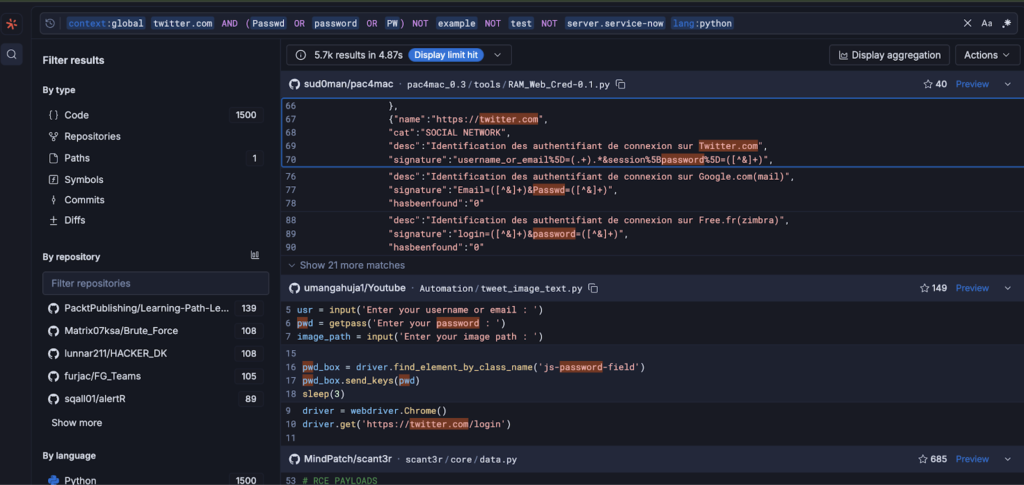
Breakdown of this command:
- service-now.com: Restricts results to this specific domain.
- AND (Passwd OR …): Targets potential credentials.
- NOT example…: Removes dummy data and test servers to ensure the find is legitimate.
- lang:python: Limits the search to Python scripts.
Step 3: Analyzing Results
When you run this query, Sourcegraph returns results instantly. In our test case, it returned 87 results in 0.385 seconds.
You can immediately see the context. For example, a result might show a requests.post call including auth=(user, pwd), revealing hardcoded “admin” credentials.
Comparison: Sourcegraph vs. GitHub Search
| Feature | GitHub Search | Sourcegraph |
| Speed | Slows on large repos | Blazing fast (Indexes everything) |
| Query Power | Basic text lookup | Regex + Structural Search |
| History | Latest branch only | Entire commit history |
| Cross-Repo | Restricted/Expensive | Search all org repos + forks |
Conclusion
For developers and security professionals, the ability to “Google” your codebase effectively is a superpower. By moving beyond basic text search and utilizing the structural and regex capabilities of Sourcegraph, you can secure your applications more constructively.
To strengthen this process further, teams often combine code search workflows with application security, cloud security, and VAPT services.